Onwords 1.3.3 is out, and it brings two major changes: clearer visuals when creating and editing two-speaker scripts, and a Stream Deck plugin that allows you to control Onwords with twelve keys available.
See who says what, while you write
Two-speaker mode has been in Onwords since launch: mark a line for Speaker A or Speaker B and the prompter tints it, pale yellow for one and pale blue for the other. Now the editor colours as you type, in the same yellow and blue you’ll see in the prompter. Use the Speaker A and Speaker B buttons under the script box, or type the labels yourself; the colour follows straight away. The labels themselves are dimmed so the words are what your eye focuses on. This works on Windows 10 and Windows 11 alike.
Onwords on your Stream Deck
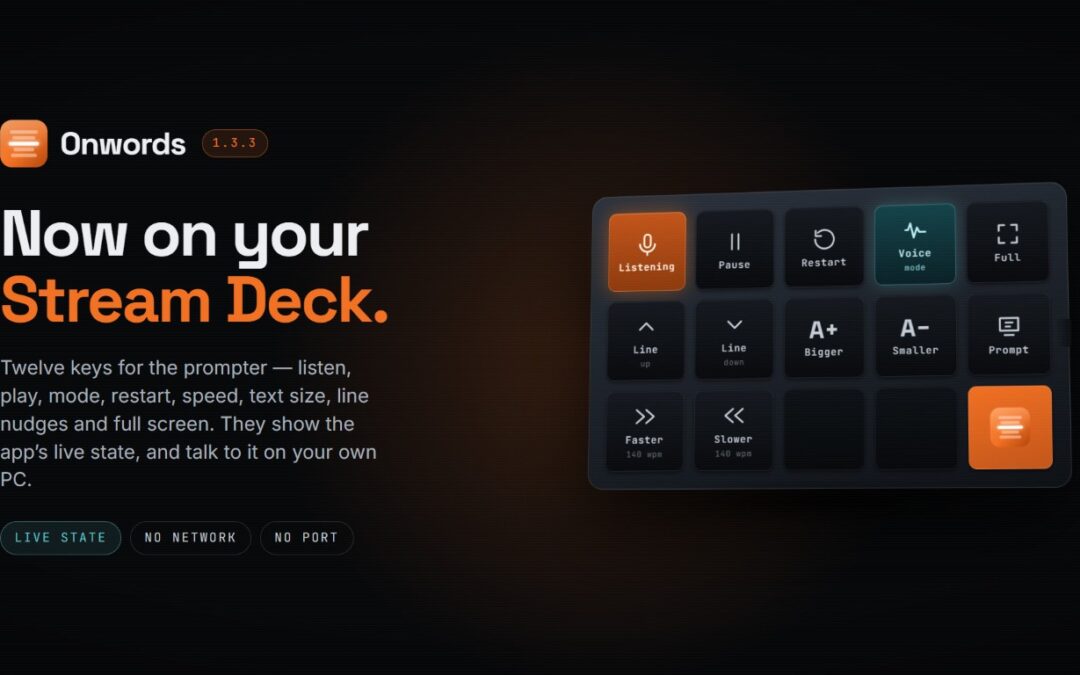
If you run an Elgato Stream Deck, you can now drive the prompter from it. The plugin gives you twelve keys:
- Listen, to start and stop voice tracking in Voice-Follow mode
- Play / Pause, to run and hold the scroll in Auto-Scroll mode
- Mode, to switch between Voice-Follow and Auto-Scroll
- Restart, back to the top
- Faster and Slower, scroll speed in words per minute
- Text bigger and Text smaller
- Line up and Line down, to nudge the marker a line at a time
- Fullscreen
- Prompt / Edit, to jump between the editor and the prompter
The keys aren’t just triggers; they’re a read-out. Listen lights up while the app is listening; Play becomes Pause while the script is scrolling; Mode shows you which mode you’re in; and the speed and text keys retain their current values. If Onwords isn’t running, the keys say so, and they repaint the moment it starts. Handy when the laptop is behind you, and the camera is in front.
The plugin and the app communicate over a local connection on your PC. Nothing goes over the network; there’s no port to open and no firewall prompt to dismiss. You’ll need Stream Deck software 6.9 or later on Windows, and Onwords 1.3.3 or later.
Get the Stream Deck plugin (COMING SOON – IN REVIEW).
The rewrite tool now says what it does
On Copilot+ PCs, the wand button beside the script box rewrites your script in a different tone. It was easy to miss as an icon on its own, so it now carries the label “Rewrite Script”. Same tool, easier to find. It still runs entirely on your device, using the language model built into Windows, and your script isn’t uploaded anywhere.
Smaller things
- Help > About now opens as a pop-up in the middle of the app, rather than a separate window that could land on whichever screen it fancied. It also links to the notices for the open-source components Onwords is built on.
- Help > Open Log Folder now opens the right folder on a Store install. (The recognition log is off unless you switch it on, and it’s there for support.)
- A slimmer Help menu.
Your saved script and any speaker assignments in it are untouched by this update, so there’s nothing to move or check.
Getting the update
If you already have Onwords, the Microsoft Store will bring 1.3.3 to you on its own; there’s nothing you need to do. If you’d rather not wait, open the Onwords listing in the Microsoft Store, or open the Store, go to Library and choose Get updates. You can check which version you’re on under Help > About.
Not got it yet?
Onwords is a teleprompter that listens to you rather than making you keep up with it. Speech recognition runs entirely on your own machine, so your scripts never leave your computer and no internet connection is needed at any point.
- Download Onwords from the Microsoft Store, £19.99 once, no subscription, with 20% off while the launch offer runs. Free for seven days first, with everything unlocked.
- Have a look round the Onwords website, including guides for podcasters, social video and live streams and webinars.
- Watch the trailer, a minute long, and quicker than reading about it.
- Support and FAQs.
As ever, keep the feedback coming. The Stream Deck plugin exists because people asked for it, and there’s more on the way, including a Mac version.
Elgato and Stream Deck are trademarks of their respective owners; Onwords is not affiliated with or endorsed by Elgato.