Over the past year, we’ve produced a lot of podcasts and social media videos, and plenty of them involve someone reading from a script. So we tried the teleprompter apps. Nearly all of them wanted a subscription, often north of £10 a month. The ones that didn’t fell short in other ways: text scrolling at a fixed speed you have to chase, everything going screwy the moment a presenter ad-libbed, and total collapse if there were two hosts.
So we built the app we actually wanted to use. It’s called Onwords, and it’s out now on the Microsoft Store.
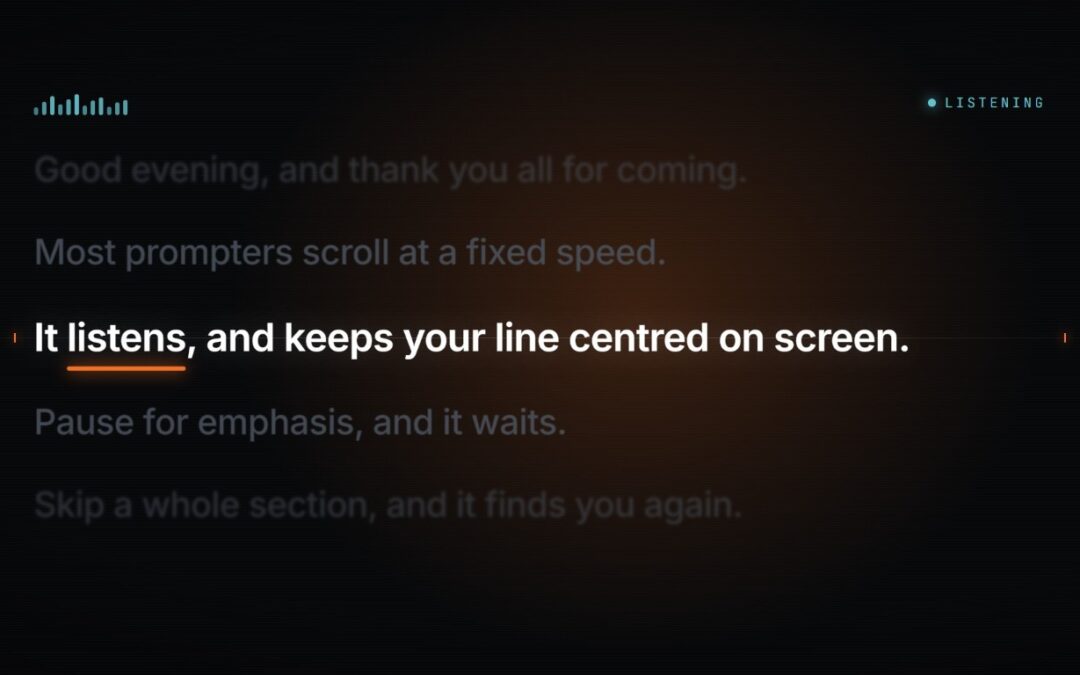
Onwords is a teleprompter that listens to you and follows your voice, rather than making you keep up with it. Paste your script in, start talking, and it moves the text so the line you’re reading stays centred on screen. Pause, and it waits. Stumble or ad-lib, and it stays with you. Skip a whole section because the last take covered it and it catches up within a sentence or two. You speak at whatever pace suits the material, and the script keeps pace with you.
Buy it once
Onwords is £19.99 (about $23.99), and we’ve got a launch sale on at £15.99 ($19.19). That’s the whole story. No subscription, no account, no tiers, nothing to cancel!
Most of the apps we tried wanted more than £10 a month, forever, to scroll text down a screen. Onwords costs less than two months of that, and then it’s yours. There’s a free 7-day trial on the Store as well, so you can point it at a real script before you spend anything.
It runs entirely on your own machine
The speech recogniser is bundled inside the app and runs on your own processor. No cloud service, no API key, no account to create, and no internet connection needed at any point. No audio is recorded or stored; there’s no telemetry, and the app makes no network calls at all. Nothing you say or write ever leaves your machine.
That matters more than it sounds. A script is often the most sensitive thing in the production: results that aren’t public yet, a launch under embargo, an internal briefing, anything under NDA, or just a draft nobody’s ready to show. Uploading that to a transcription service so a teleprompter will scroll is a strange trade, and one people make without really deciding to. We’d rather it never came up.
Onwords is Windows-only for now. But we’re hoping to have the Mac version ready in just a few weeks (register your interest here).
Two presenters, one script
This is the feature we’re most pleased with. On some of the videos we’ve made for the University of Leicester’s Institute for Policy we’ve had more than one person reading, and a normal teleprompter really struggles with that. You get one undifferentiated wall of text, and the hosts can’t tell which lines are theirs.
Onwords lets you assign lines to each presenter and colour-codes them on screen, pale yellow and pale blue. Tracking runs straight through the changeover because it simply follows whoever is talking, and both presenters share one microphone, so there’s nothing extra to set up. A handover becomes something you see coming rather than something that catches a presenter out.
The assignments are stored in the script itself, so they survive editing and save with everything else. If you paste in a script that already marks its speakers, it just works.
How it keeps its place
Dictation software has a hard job. It has to work out which of a hundred thousand English words you just said, with no idea what you’re talking about, which is why names, jargon and technical terms get mangled: exactly the words that matter in a script.
A teleprompter has an advantage there, because it already knows what you’re about to say. Onwords makes the most of that, and in our testing it cut misheard words to roughly a third. How it does that is our own recipe. What you notice is that it stays with you on the words other tools trip over.
Presenters rarely stand next to the laptop, so it’s built to cope with distance, background noise, and accents that older recognisers stumble over.
Worth saying plainly: Onwords is built to hold your place, not to transcribe you. It’s designed to keep following you even when it mishears.
The rest of it
Everything else is the stuff you need on an actual shoot. Mirror mode for beam-splitter teleprompter hardware. Text you can scale up for distance from the lens or down to fit more on. Full screen on a second display while you keep the controls on your laptop. A live transcript and a mic-level meter so you can see what it’s hearing, and a warning when it can’t hear you at all, rather than leaving you guessing.
If you’d rather not use your voice, there’s Auto-Scroll: a steady scroll at a speed you set in words per minute, with a Play button that waits for your cue rather than starting the moment you look away. You can nudge the position with the arrow keys or the mouse wheel at any point, in either mode.
In the editor you get word count, character count and a rough delivery time as you write, which is quietly useful when you’re cutting a script to fit a slot. On Copilot+ PCs, there’s also a rewrite tool that will restyle your script before you record, and, like everything else in the app, it runs on your own device. That one is Copilot+ only, so it won’t appear on every machine.
Your script saves automatically and comes back next time, so there’s no re-pasting between takes. It’s a proper native Windows app too, built with WinUI, with separate builds for Intel/AMD and ARM machines. It starts quickly, uses almost no CPU while you read, and installs self-contained, with no runtimes to chase.
Get it
Onwords is out now on the Microsoft Store, £19.99 ($23.99), currently £15.99 ($19.19) in our launch sale. There’s a free 7-day trial if you’d like to try it on a real script first.
Windows 10 version 1809 or later and Windows 11, 64-bit, Intel/AMD or ARM. Onwords is English-only for now, though you can try other languages through the classic Windows speech engine. Full details, screenshots and support are at onwords.app.